
| |
|
|
 Express Invoice Plus 9.14 macOS | 2.7 MB Express Invoice lets you create invoices you can print, email or fax directly to clients for faster payment. The reporting functionality allows you to keep track of payments, overdue accounts, sales team performance and more.  Express Animate 6.39 macOS | 8 Mb Express Animate is animation software that gives you the ability to animate shapes, text and imported images. You are also able to enhance your movie projects in post-production using key-frame motion animation, masking, dummy objects and more. 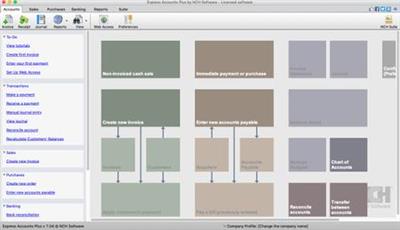 Express Accounts Plus 9.11 macOS | 3.8 Mb Express Accounts is professional business accounting software, perfect for small businesses needing to document and report on incoming and outgoing cash flow including sales, receipts, payments and purchases.  Exposure Software Eye Candy 7.2.3.176 | macOS | 81 mb Eye Candy 7 renders realistic effects that are difficult or impossible to achieve in Photoshop alone, such as Fire, Chrome, and the new Lightning. Effects like Animal Fur, Smoke, and Reptile Skin are rendered in exquisite detail down to individual hairs, turbulent wisps, and shiny scales  ExactScan Pro 21.11 Multilingual | macOS | 19 mb ExactScan Pro is the professional scan solution for a paperless office on the Mac. ExactScan comes with over 400 drivers for professional document scanners from Avision, Canon DR-series, Fujitsu fi-series, Kodak, Oki, Panasonic, Visioneer and Xerox, which otherwise do not come with a Mac driver.  eBookBinder 1.10.0 | macOS | 9 mb eBookBinder is the super-easy tool to create your own ebooks using your existing documents. When compiling your book project, eBookBinder creates an epub file.  DxO PhotoLab 5 ELITE Edition 5.0.1.41 Multilingual | macOS | 678 mb DxO PhotoLab (was DxO Optics Pro) provides a complete set of smart assisted corrections that you can manually fine-tune at any time. Take control on every aspect of your photos: effectively remove noise, get rid of light constraints, recover color details, apply sophisticated optical corrections, and enhance details.  DVD-Cloner 2021 v8.40.726 | macOS | 27 mb DVD-Cloner for Mac is the up-to-the-minute generation of the top DVD copy software for Mac worldwide. It enables you to copy/clone/burn DVD movies on Mac with lossless quality. The brand-new interfaces make DVD copy for Mac much easier than before. Besides, it can remove various DVD copy protections such as CSS, RE, RCE and region codes to copy DVD movies without restrictions. It can also make another copy from the burnt DVD freely without using your original DVD disc again.  DropDMG 3.6.2 | macOS | 26 mb DropDMG is the easiest way to create OS X disk images, which pack entire folders or disks into a single compressed file, either for transport across the Internet or simply for backup. They are Apple's preferred format for distributing Mac software. Disk images are also the only archive format whose contents you can directly access in the Finder.  Default Folder X 5.6.1 | macOS | 19 mb Folder X attaches a toolbar to the right side of the Open and Save dialogs in any OS X-native application. The toolbar gives you fast access to various folders and commands. You just click on the buttons to go to your favorite and recently used folders, manage the folders and files shown in the list, and make changes to your settings |

 :
:
