
| |
|
|
 Kaleidoscope 2.4.5 | macOS | 27 mb Spot the differences. Merge in seconds. With text merge, three-way merge, folder comparison, and the ability to ignore whitespace-only differences, Kaleidoscope integrates perfectly with the version-control systems you already use. 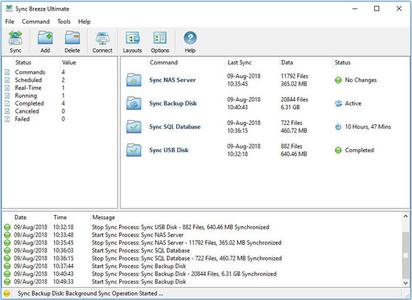 Sync Breeze Pro / Ultimate / Enterprise 14.0.28 (x86/x64) | 39.5 Mb SyncBreeze is a fast, powerful and reliable file synchronization solution for local disks, network shares, NAS storage devices and enterprise storage systems. Users are provided with multiple one-way and two-way file synchronization modes, periodic file synchronization, real-time file synchronization, bit-level file synchronization, multi-stream file synchronization, background file synchronization and much more. SyncBreeze Main GUI Application The SyncBreeze main GUI application allows one to configure and control file sync operations. The user is provided with multiple file synchronization modes, performance tuning options, periodic file synchronization operations, real-time file synchronization operations, bit-level file synchronization, file synchronization logs and error notifications. File Synchronization Modes SyncBreeze provides a number of one-way and two-way file synchronization modes optimized for different usage scenarios. Users can setup a number of file synchronization commands with each one pre-configured to synchronize files according to user-specific needs and requirements. File Synchronization Preview Dialog The file synchronization preview dialog shows all sync actions that should be performed and allows one to select/unselect specific actions. The preview dialog is displayed in the 'Preview' file synchronization mode and it may be effectively used for small-sized to medium-sized file systems. For large file systems containing millions of files, SyncBreeze provides the 'Stream' file synchronization mode, which synchronizes files on-the-fly, without showing the preview dialog. File Synchronization Schedule Options The file synchronization schedule tab allows one to configure periodic file synchronization operations, scheduled file synchronization operations, real-time file synchronization operations and control the file synchronization timeout. Advanced File Synchronization Options The advanced file synchronization options tab allows one to control the file copy mode, file copy verification mode, file synchronization performance mode, the number of parallel file synchronization streams and configure recoverable file copy operations. Supported Operating Systems: Windows XP, Vista, 7, 8, 8.1, 10, 11 and Server 2003, 2008, 2008 R2, 2012, 2012 R2, 2016 Home Page - https://www.syncbreeze.com/ Buy Premium From My Links To Get Resumable Support,Max Speed & Support Me https://uploadgig.com/file/download/c5F1fAea1c20ef89/0tewl.Sync.Breeze.Pro..Ultimate..Enterprise.14.0.28.rar https://hot4share.com/nr5uvhmmkqzt/0tewl.Sync.Breeze.Pro..Ultimate..Enterprise.14.0.28.rar.html  https://rapidgator.net/file/719284ad5b5570aa586cfd3c76af33ac/0tewl.Sync.Breeze.Pro..Ultimate..Enterprise.14.0.28.rar.html  https://nitro.download/view/52A6BEC1AC92451/0tewl.Sync.Breeze.Pro..Ultimate..Enterprise.14.0.28.rar  MAGIX Photostory 2022 Deluxe 21.0.1.96 Multilingual | Windows x64 | File size: 1.04 GB Beautiful moments are even better when you share them with others. Transform the most treasured photos of your adventures on vacations, family celebrations and the little surprises of everyday life into animated slideshows with Photostory Deluxe. Experience your best moments over and over again with friends and family.  MAGIX Movie Edit Pro 2022 Premium 21.0.1.111 Multilingual | Windows x64 | File size: 1.01 GB MAGIX Movie Edit Pro 2022 is the next generation of video editing: faster, better and even more powerful than ever before! The software provides everything you need to design your movies. This MAGIX software also offers high-quality special effects, cinematic transitions and templates, Full 4K Ultra HD, Full Stereo3D and Full HD support (for HDV and AVCHD camcorders), advanced dubbing (Dolby Digital 5.1 mixer, etc.), 99 tracks, MultiCam editing, travel route animation, etc.  MAGIX Video Pro X13 v19.0.1.133 Multilingual | Windows x64 | File size: 857.45 MB Video Pro X makes professional video production accessible for everyone. With its clearly structured interface and intuitive functions, getting started with Video Pro X is much easier than with other professional editing software. Video Pro X also delivers cutting-edge technology for video editing with a new INFUSION Engine 3 that ensures smooth playback and cutting in real time, even for high-resolution 8K UltraHD recordings. 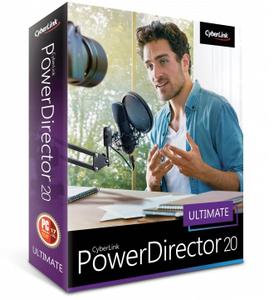 CyberLink PowerDirector Ultimate 20.1.2415.0 (x64) Multilingual | 981.7 Mb Video Editing For All Creators, Powered By AI. Tell Your Story the Way You Imagined. Create Professional Level Edits Effortlessly. Intuitive editing tools that help you set objects in motion, completely transform a scene's location, and create cinematic effects.  Instructors: Bill Deav 1 section • 6 lectures • 1h 10m total length Video: MP4 1280x720 44 KHz | English + Sub  Instructors: Julianne DiBlasi 1 section • 11 lectures • 33m total length Video: MP4 1280x720 44 KHz | English + Sub  MP4 | Video: h264, 1280x720 | Audio: AAC, 44.1 KHz, 2 Ch Genre: eLearning | Language: English + srt | Duration: 8 lectures (32m) | Size: 302.5 MB Transform any Excel spreadsheet into a user-friendly interface within 30 minutes using Excel VBA  Instructors: Duane Thomas Dsouza 4 sections • 27 lectures • 59m total length Video: MP4 1280x720 44 KHz | English + Sub |

 :
:
