Last updated 1/2022 MP4 | Video: h264, 1280x720 | Audio: AAC, 44.1 KHz Language: English | Size: 1.92 GB | Duration: 9h 18m From Concept to Finished Painting
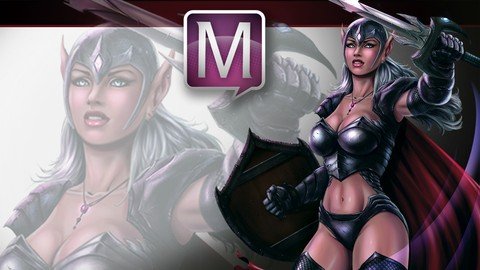
What you'll learn Draw and paint character designs with more confidence. Use Manga Studio 5 / Clip Studio Paint effectively. Digitally paint a variety of materials. Requirements Basic understanding of a computer and a tablet. Basic understanding of Manga Studio 5. Description In this Course you will learn How to Create a Fantasy Art Character from the rough sketch all the way to the finished paint work. We start with the drawing process and I explain how to make changes to the concept and not get too worried about everything being perfect in the beginning. There are lots of ways to edit the work and keep pressing forward within Manga Studio 5 / Clip Studio Paint. We will then cover how to lay in the base paint work and use that to create and save our selections. You will learn how to use the layers to aid in your painting process, as well as how to work in a non-destructive approach. Once the foundational information is in place we will begin to apply our digital painting effects with a variety of brushes. ( You will get access to all the brushes I use in this Course. ) You will also learn how to create and apply a texture effect for the chain mail on the characters armor. We will be using the "Distort" and "Mesh Transformation" features to accomplish this. Through this course you will learn how to use : Layers and Groups, Combine Modes ( Blending Modes ), Custom Brushes, Hard and Soft Edge Shadows, Layer Masks, Quick Masks, Blending Brushes, Tonal Correction, Mirrored Windows, as well as General Drawing and Painting Techniques. This course is 9 Hours and 17 Minutes total run time. 35 Individual Lessons. You get the Layered Art Files and the Custom Brushes to work along with. I am here if you have any questions or feedback for me to make this a better Course for everyone. So please feel free to let me know!Robert A. Marzullo Ram Studios Comics Overview Section 1: Drawing and Cleaning up the Line Work for Our Character Design Lecture 1 The Rough Sketch Part 1 Lecture 2 The Rough Sketch Part 2 Lecture 3 The Rough Sketch Part 3 Lecture 4 The Rough Sketch Part 4 Section 2: Adjusting the Line Art with Mesh Transformation and Adding Textures Lecture 5 Using Mesh Transformation and Cleaning up the Line Work Lecture 6 Creating the Chain Mail Texture and Distorting it Into Place Section 3: Creating Selections and Applying the Base Paint Lecture 7 Understanding the Layer Mask Feature and Creating a Shape Selection Lecture 8 Using the Selection Layer Feature and Creating a Flood Fill Lecture 9 Drawing Out More Selections and Segmenting the Work Lecture 10 Creating and Saving Our Final Selections Section 4: Making Additional Edits to the Concept with Mesh Transformation Lecture 11 Using the Mesh Transformation and Selections Through Multiple Layers Section 5: Adding in the Digital Paint Effects to the Character Lecture 12 Apply the Base Shadows and Highlights to the Armor Lecture 13 Apply Texture and Color to the Armor Lecture 14 Adding More Texture and Details to the Armor Lecture 15 Painting the Cape Section 6: Detailing the Background Lecture 16 Painting the Mountains Lecture 17 Detailing the Mountains and Painting in the Sky Section 7: Adding More Paint Effects to the Character Lecture 18 Painting the Chain Mail Lecture 19 Painting the Hair Lecture 20 Painting the Shield Lecture 21 Painting the Sword - Part 1 Lecture 22 Painting the Sword - Part 2 Lecture 23 Painting the Sword - Part 3 Section 8: Painting the Skin and the Face Lecture 24 Painting the Skin Lecture 25 Painting the Face - Part 1 Lecture 26 Painting the Face - Part 2 Lecture 27 Painting the Face - Part 3 Section 9: Fixing the Work Lecture 28 Using Quick Mask to Fix Areas of Your Work Lecture 29 Touching up the Work - Part 1 Lecture 30 Touching up the Work - Part 2 Section 10: Final Adjustments Lecture 31 Refining the Edge Work Lecture 32 Using Selections to Add Color Effects Lecture 33 Adding Contrast to the Background Lecture 34 Add the Final Highlights to the Character Lecture 35 Post Processing Effects Section 11: Practice Activities + Resources Lecture 36 Tutorial Sheet for you to practice painting a face Lecture 37 Bonus Lecture Anyone that wants to improve their knowledge on how to digitally paint like the pros do.,Students that are studying for concept art and design.