Published 11/2022 MP4 | Video: h264, 1280x720 | Audio: AAC, 44.1 KHz Language: English | Size: 3.43 GB | Duration: 4h 11m A Beginner's Guide to the world of PCB Designing
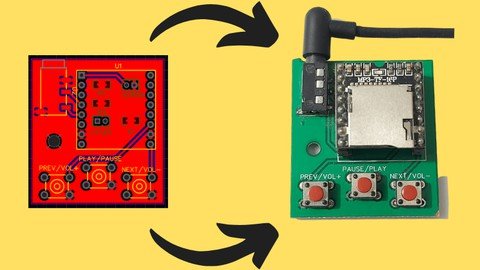
What you'll learn Workflow of PCB Design Various Features of EasyEDA Software Build a cool MP3 Player Schematic and Layout Design Rules Gerber File Generation for Fabrication Footprint Verification Trace Width Calculation Different layers of a PCB (Silkscreen, Solder Mask, Paste Mask) Requirements Laptop/ Copmuter with Internet connection Description Learn PCB Designing by building an MP3 Player from scratch. Right from making the reference circuits, testing them, designing the schematic and layout to finally enjoy the finished product!Become skillful at designing PCBs with this Comprehensive CourseLearn about the EasyEDA SoftwareDesign a 2 layered PCB for an MP3 Player!Grasp the various features provided by EasyEDAMaster the concepts pertinent to PCBs (Vias, Copper Pour, Trace width, Layer, etc.)Generate Gerber Fabrication File and know what it comprises Understand and Implement various features provided by the ESP32Get Familiarized with the Design Rules for Schematics & LayoutLearn PCB Designing to add another feather in your capThis course is designed to explore all of these features with a very practical approach. If there is one goal of our course, it's to give you enough knowledge and confidence to go out there and build your own projects, which is the true essence of this course. This course is project based, so by the end of it, you'll know how to make an really cool MP3 player with various features to change the song, volume, & pause play button.Overview of the Course: This course is meant for people who want to get started with PCB Designing or those who want to convert their ideas into full fledged products. By taking this course, you'll be able to learn everything that one needs to know about designing PCBs and hence give you enough confidence to build projects on your own.We start off with a brief introduction to EasyEDA, the software which will be used to design our PCBs. And then move on to the various rich features it provides us with. The primary reason for choosing EasyEDA is becauseIt is completely freeShort learning curveCloud Based Platform Personally, I don't like to learn anything if there is no proper end goal in mind. And that's why I have specifically designed this course with a very practical approach. All the necessary information that a beginner needs to know about PCB designing are mentioned in this course. We discussed the workflow required for PCB designing: Ideation, Component selection, Testing and then using the software to design the Schematic and Layout of our PCB. To keep things interesting, we've included quizzes and coding assignments as well. These are not too difficult that will make you tear your hair out, but just hard enough to pique your interests.To make it easier for you to keep in track with the course, we have added external resources such as documentation, circuits & design files that have been used in the videos Complete with working files and designs, you'll be able to work alongside the instructor as you work through each concept, and will receive a verifiable certificate of completion upon finishing the course Overview Section 1: Module 1 Lecture 1 Welcome to the Course! Lecture 2 Introduction to EasyEDA Lecture 3 Creating a New Project Lecture 4 Features of EasyEDA Lecture 5 Documentation Section 2: Module 2 Lecture 6 Designing the Schematic Lecture 7 Testing the Circuit Lecture 8 Documentation Section 3: Module 3 Lecture 9 DF Mini Player Library Part Lecture 10 Verifying DF Mini Player Lecture 11 Selecting Push Buttons Lecture 12 Wiring the Push Buttons - Part 1 Lecture 13 Wiring Push Buttons - Part 2 Lecture 14 Adding Audio Jack Lecture 15 Adding Pinouts for Rx/ Tx pins Lecture 16 Wiring the Power Supply Lecture 17 Renaming the Components Lecture 18 Documentation Section 4: Module 4 Lecture 19 Converting the Schematic to PCB Lecture 20 Updating the Schematic Lecture 21 Component Placement - Part 1 Lecture 22 Component Placement - Part 2 Lecture 23 Component Placement - Part 3 Lecture 24 Different Layers of a PCB Lecture 25 Documentation Section 5: Module 5 Lecture 26 Trace Lecture 27 Resizing the PCB Lecture 28 Routing - Part 1 Lecture 29 Routing - Part 2 Lecture 30 Rectangular Pour Lecture 31 Vias Lecture 32 DRC & Views Lecture 33 Group/ Ungroup Lecture 34 Documentation Section 6: Module 6 Lecture 35 Gerber File Lecture 36 Placing Order Lecture 37 Documentation Section 7: Module 7 Lecture 38 PCB Unboxing Lecture 39 Final Look of the PCB Lecture 40 Demonstration Lecture 41 Conclusion Lecture 42 Resources Makers/ Hobbyist interested in PCB Design,Anyone who wants to convert their idea into a finished product,Engineering Students looking for an opportunity to upskill