

 :
:
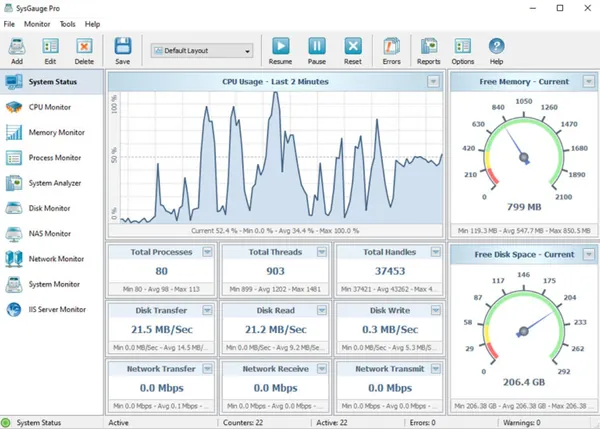
SysGauge 13.0.12 All Editions | 39 Mb
SysGauge is a system monitoring utility designed to analyze computer performance, resource usage, and operating system activity. The software allows users to monitor important system metrics such as CPU usage, memory consumption, disk activity, network traffic, running processes, and storage utilization.
SysGauge provides a flexible monitoring environment where users can configure performance counters, view real-time charts, generate reports, and create notification rules. It is suitable for system administrators, IT professionals, and advanced users who need detailed information about hardware and software resource usage.
The application supports multiple monitoring modules for different areas of system performance, including processors, memory, processes, disks, network activity, USB devices, and file system operations. Users can create custom monitoring profiles to track specific performance conditions over time.
Key Features:
- Monitor CPU, memory, disk, network, USB, and file system performance.
- Display real-time system monitoring charts and performance statistics.
- Track running processes and analyze their resource consumption.
- Configure custom performance counters and monitoring profiles.
- Generate system monitoring reports for analysis and documentation.
- Create monitoring rules with actions and notifications.
- Receive sound and email alerts for selected system conditions.
- Analyze CPU activity including usage levels, frequency, and interrupt information.
- View detailed memory statistics including cache, paging, and available resources.
- Monitor process activity including CPU usage, memory usage, threads, handles, and data transfer rates.
Why Choose SysGauge:
SysGauge is designed for users who need detailed visibility into system performance and resource utilization. It provides a centralized interface for tracking multiple hardware and software metrics without requiring separate monitoring tools.
The software is suitable for troubleshooting performance issues, managing computer resources, creating reports, and monitoring workstations or servers in professional environments.
System Requirements:
Windows XP, Vista, 7, 8, 8.1, 10, 11
Server 2003, 2008, 2008 R2, 2012, 2012 R2, 2016, 2019, 2022, 2025
FAQ:
What is SysGauge used for?
SysGauge is used for monitoring computer performance, system resources, running processes, and operating system activity.
Can SysGauge monitor CPU and memory usage?
Yes. The software includes dedicated modules for tracking CPU activity and memory consumption in detail.
Does SysGauge support report generation?
Yes. Users can save different types of system monitoring reports for analysis and documentation.
Can SysGauge monitor servers?
Yes. The software supports multiple Windows Server operating systems and can be used for system monitoring tasks.
Home Page
https://www.sysgauge.com/
Product Information:
- Software Name: SysGauge
- Version: 13.0.12
- Architecture: x86/x64
- Languages: English
- License type: Full Version
- File Size: 39 Mb
Buy Premium From My Links To Get Resumable Support,Max Speed & Support Me
Rapidgator
kvdb4.SysGauge.13.0.12.rar.html
UploadCloud
kvdb4.SysGauge.13.0.12.rar.html
DDownload
kvdb4.SysGauge.13.0.12.rar
FreeDL
kvdb4.SysGauge.13.0.12.rar.html
KatFile
kvdb4.SysGauge.13.0.12.rar.html
Links are Interchangeable - No Password - Single Extraction