

 :
:
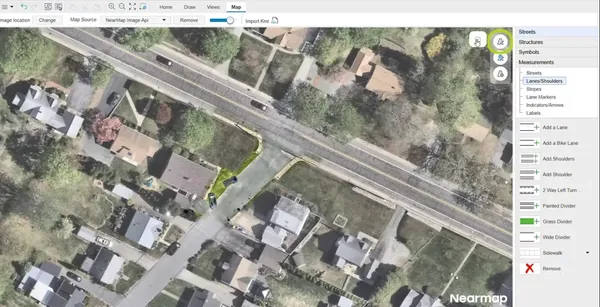
Free Download Trancite AutoScene Draw 26.0.0.38477 (x64) | 180.7 Mb
Trancite AutoScene Draw is a diagramming and scene documentation application designed to help agencies and organizations create accurate visual representations of real-world locations. It provides tools for producing professional scene diagrams for reporting, analysis, and documentation purposes.
AutoScene Draw is designed for professionals who need to quickly create standardized diagrams for different operational scenarios. The software supports workflows involving crash reconstruction, crime scene documentation, emergency planning, and other situations where accurate scene visualization is required.
The application allows users to generate diagrams from location information, import images from drones or laser scanners, and maintain control over their data by keeping files within their own storage environments.
Software Overview
Trancite AutoScene Draw provides a streamlined approach to creating detailed scene diagrams without requiring complex manual drawing processes. Users can enter location information, generate scenes automatically, and customize diagrams according to their documentation requirements.
The software is suitable for agencies, organizations, and professionals who need consistent and reliable visual reports. It can be deployed as a desktop application, integrated into reporting systems, or used through web-based environments.
AutoScene Draw focuses on practical diagram creation with built-in data validation tools and support for real-world location visualization.
Key Features
- Create professional scene diagrams quickly.
- Generate diagrams based on real-world locations.
- Import and geo-locate images from drones or laser scanners.
- Support desktop, embedded, and web application deployment.
- Maintain control of files within local servers or RMS environments.
- Create standardized scene documentation for reporting workflows.
- Provide built-in validation for people, places, and objects.
- Support crash, crime, emergency planning, and operational scenarios.
Why Choose Trancite AutoScene Draw
Trancite AutoScene Draw helps organizations simplify the process of creating accurate scene diagrams while maintaining consistent documentation standards. Its workflow is designed for professionals who require efficient visualization tools for operational and reporting tasks.
The software is suitable for law enforcement agencies, emergency teams, and other organizations that need structured scene documentation with flexible deployment options.
System Requirements
Windows operating system
64-bit architecture
Home Page
https://www.trancite.com/asd
Product Information
- Software Name: Trancite AutoScene Draw
- Version: 26.0.0.38477
- Architecture: x64
- Languages: English
- License type: Full Version
- File Size: 180.7 Mb
Buy Premium From My Links To Get Resumable Support,Max Speed & Support Me
Links are Interchangeable - No Password - Single Extraction