

 :
:
Free Download Coolmuster Android Assistant 6.1.60 Multilingual | 24.4 Mb
Coolmuster Android Assistant is a desktop management utility that helps users organize, transfer, back up, and restore data stored on Android smartphones and tablets. It provides a centralized interface for managing contacts, messages, media files, applications, and other mobile content directly from a Windows computer.
The software is suitable for users who regularly maintain Android devices, migrate data, or create backups before performing system updates or device replacements. With support for a wide range of Android brands, it simplifies everyday device management while keeping important information accessible on a PC.
Software Overview
Coolmuster Android Assistant provides a complete set of tools for managing Android data without relying solely on the mobile device. Users can browse and organize contacts, SMS messages, photos, music, videos, applications, and other supported content through an intuitive desktop interface.
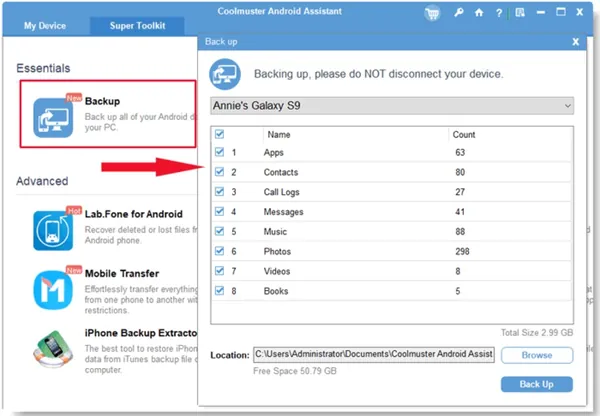
The application also includes one-click backup and restore capabilities, allowing users to create complete backups of their Android devices and restore selected or all saved data whenever needed. In addition, it supports transferring files between a computer and an Android device, making it easier to manage storage and synchronize media.
Key Features
- Back up and restore Android data with a single click
- Transfer photos, videos, music, and other files between PC and Android devices
- Manage contacts by adding, editing, deleting, and removing duplicates
- Send, receive, and organize SMS messages from a computer
- Install, uninstall, back up, and restore Android applications
- Export contacts, messages, media files, and apps to a computer
- Import media files from a computer to an Android device
- Support group text messaging from the desktop
- Compatible with a wide range of Android smartphones and tablets
- Performs read-only operations to help protect existing device data
Why Choose Coolmuster Android Assistant
Coolmuster Android Assistant provides a practical solution for users who prefer managing Android devices from a desktop computer instead of navigating everything on a phone. It combines backup, file transfer, contact management, and application management into a single interface.
Its broad compatibility with many Android manufacturers and straightforward workflow make it suitable for both personal and professional device management tasks.
System Requirements
Operating System: Windows 11/10/8/7
Frequently Asked Questions
What is Coolmuster Android Assistant used for?
It is used to manage Android devices from a Windows computer, including backing up data, transferring files, and organizing contacts, messages, and applications.
Can the software back up an entire Android device?
Yes. It includes one-click backup and restore functionality for supported Android data.
Can I send text messages from my computer?
Yes. The software allows users to send, reply to, and manage SMS messages directly from the desktop.
Which Android brands are supported?
It supports many Android devices, including models from Samsung, Huawei, Motorola, Sony, LG, HTC, ZTE, Dell, and other compatible manufacturers.
Home Page
https://www.coolmuster.com/
Product Information
- Software Name: Coolmuster Android Assistant
- Version: 6.1.60
- Languages: Multilingual
- License type: Full Version
- File Size: 24.4 Mb
Visit All My News
Buy Premium From My Links To Get Resumable Support,Max Speed & Support Me
Links are Interchangeable - No Password - Single Extraction