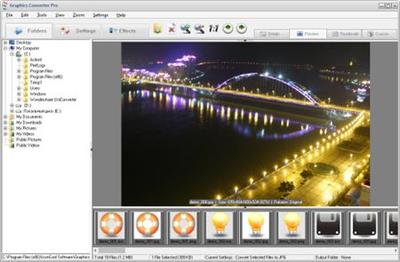
Graphics Converter Pro 4.54 Build 200620 | 42.8 Mb
Graphics Converter Pro is an easy-to-use and powerful batch graphic converter and image viewer, that can import more than 500 graphic formats and export more than 100 formats including BMP, GIF, JPG, PNG and many others. The program comes with 40 image filters and 12 image effects and more. Graphics Converter Pro supports many vector graphic formats.
Graphics Converter Pro contains all functions of ImageCool Converter. Exclusively, it supports 22 vector graphic formats conversion.
Features:
Support more than 500 graphic formats, and Graphics Converter Pro supports 22 vector graphic image formats, including CGM, DGN,DWF, DXF, DWG,GBR, PCT, PLT, WMF and more. For more details, please read list of 500 supported formats.
Graphics Converter Pro supports conversions between 100+ formats and JPG2000(JP2, J2K, JPC and JPF) images.
Support batch conversion from PDF files to 100+ graphic formats, such as JPG, GIF, PNG, TIF and so on.
Support batch conversion from 500 formats to PDF.
Graphics Converter Pro also can convert vector graphics(such as DWG, CGM, DGN, DWF and etc.) to PDF.
Offer 40 image filters, including Blurring, Sharpening, Embossing, Diffusing, Color Balance, and more.
Offer 12 image effects, including Resizing, Flip, Wave, Noise, Arbitrary Rotation, and more. You can resize images in batches easily.
You can save your selected filters or effects as default options, and apply them in a batch processing.
What's new in Graphics Converter Pro?
Alpha Channel Support: Graphics Converter Pro fully supports Alpha channel in 32-bit PNG or ICO formats and fully supports transparence layer in GIF, PNG or ICO formats.
Multi-Page Format Support: Graphics Converter Pro fully supports Multi-Page formats. You can convert, create or preview Multi-Page images, including TIF, GIF, PCX, AWD, WFX, FLI and FLC.
Powerful Resizing Functions: Supports three resizing modes, including "Standard Size", "Custom Size" and "Proportion Size". There are 50 standard sizes in the "Standard Size" mode.
Large Image Support: If the image is too large to completely load into memory, Graphics Converter Pro will resize the file as it loads.
Large Icon Creating: Create more than 512x512 pixels icons from any other supported formats.
Preview Modes: Graphics Converter Pro has 4 preview modes, including Details, Preview, Thumbnails and Custom. You can easily switch the modes by clicking on the buttons in the upper right corner.
Operating System: Windows 7, 8/8.1, 10
Home Page -
http://www.graphics-converter-pro.com/graphics-converter.htm
Language: English
Buy Premium From My Links To Get Resumable Support,Max Speed & Support Me

https://uploadgig.com/file/download/d719e31Baa61f17E/wpxo8.Graphics.Converter.Pro.4.54.Build.200620.rar

https://rapidgator.net/file/a11002d8239ec200549a558daab8d245/wpxo8.Graphics.Converter.Pro.4.54.Build.200620.rar

http://nitroflare.com/view/F345063F87309D0/wpxo8.Graphics.Converter.Pro.4.54.Build.200620.rar
Download now LINK


 :
: