

 :
:
Free Download SayPaste 2.20260328.0 | 3.65 GB
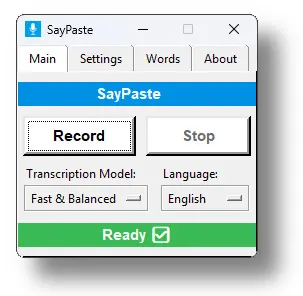
Voice-to-text app for Windows. 100% local. 100% easy. SayPaste AI runs quietly in the background and only listens when you tell it to. Just press a keyboard shortcut to start recording, and another to stop and transcribe. After transcription, the result is instantly copied to your clipboard-no need to copy manually. Just paste it wherever you need.
- Instant Voice-to-Clipboard
- Automatic punctuation
- Built on OpenAI's Whisper engine
- 100% Local & Private
- Lightning-fast keyboard shortcuts
- No subscriptions, ever!
How SayPaste Works
SayPaste AI runs quietly in the background and only listens when you tell it to. Just press a keyboard shortcut to start recording, and another to stop and transcribe. After transcription, the result is instantly copied to your clipboard-no need to copy manually. Just paste it wherever you need.
- Turn beep feedback on or off as you prefer
- Control SayPaste with global hotkeys or the simple control window
- Show or hide a transcript popup after each dictation
- Let SayPaste add punctuation automatically-or speak it yourself
- Use a custom dictionary to fix names and spoken punctuation
- Choose your Whisper model-from fastest to most accurate
- NEW! Use the Polish feature to turn rough dictation into polished text
Why SayPaste?
SayPaste AI is built for people who value privacy, speed, and control. Whether you're a writer, researcher, or just tired of typing. It gets your voice to text in high quality-controlled by easy keyboard shortcuts-and sent straight to your clipboard.
100% Local & Private
100% Local & Private
Everything runs on your computer. Nothing is sent to the cloud.
Clean & Focused
No clutter. No ads.
No Subscription
Pay once. Use it forever.
Customizable
Use the app your way.
Easy
Just start recording right away. All self-explaining. No headache.
Built on OpenAI's Whisper
Powerful, proven speech-to-text engine.
System Requirements
- Operating System: Windows 10 or 11 (64-bit)
- Disk Space: ~3.8 GB
- Install SayPaste in a local folder, not in cloud-synced locations like OneDrive or Google Drive.
- CPU: Modern quad-core (i5 / i7 / Ryzen 5 / 7 or better). ARM-based processors are not supported!
- Memory: 16 GB RAM recommended
- Microphone: Any basic microphone will work
Home Page -
https://saypaste.com
Buy Premium From My Links To Get Resumable Support,Max Speed & Support Me
Links are Interchangeable - No Password - Single Extraction