

 :
:
VoxShift 1.0.44 (x64) Multilingual Fast Links | 1.94 GB
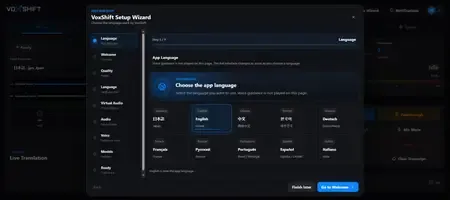
Vox Shift is a Windows app for real-time voice translation and voice generation on NVIDIA CUDA-capable PCs. It listens to your selected microphone or audio input device, translates speech, generates translated voice output, and helps route that audio to voice chat apps, games, OBS, and other live workflows. The app includes local setup guidance, reference voice recording, noise cancellation, monitor output, a soundboard, model preparation checks, and OBS subtitle support.
Audio, reference voice recordings, translated text, subtitles, settings, logs, and soundboard files are processed and stored locally by default. AI model files may be downloaded by the user and stored on the PC.
To send translated audio into other applications, a virtual audio device such as VB-Audio VB-CABLE may be required. The Microsoft Store version does not bundle VB-CABLE or any third-party driver installer. Users should review the official VB-Audio licensing terms before installing or using it.
We have enabled the generative AI declaration in Partner Center. Vox Shift uses generative AI to transcribe user-provided microphone audio, translate it, and synthesize translated voice/audio output. The Store listing metadata discloses this AI usage, and users can report inappropriate generated output or concerns via the support contact listed in the Store listing.
Features
- Real-time speech translation for live voice workflows
- AI voice generation using locally managed models
- Reference voice recording for personalized voice output
- Monitor output for checking generated audio before routing
- Soundboard playback for saved audio clips
- Noise cancellation for cleaner reference and live input
- OBS subtitle integration for streaming workflows
- Model preparation and readiness checks
- Setup wizard for audio routing and device configuration
- Local-first processing and storage by default
System Requirements
- OS: Windows 10 version 19041.0 or higher
- Memory: 8 GB (Minimum), 16 GB (Recommended)
- Video Memory: 6 GB
- Graphics Processor: NVIDIA GPU VRAM6GB (CUDA) (Minimum), NVIDIA GPU VRAM12GB (CUDA) (Recommended)
* This app is designed for Windows PCs equipped with an NVIDIA CUDA-compatible GPU. It may not work properly in CPU-only environments, AMD/Intel GPU environments, or environments with insufficient VRAM. Performance, latency, and audio quality may vary depending on the AI models, GPU drivers, virtual audio devices, microphone settings, and OS environment.
Home Page -
https://apps.microsoft.com/detail/9p8pdbjdw1jh
Buy Premium From My Links To Get Resumable Support,Max Speed & Support Me
Links are Interchangeable - No Password - Single Extraction