

 :
:
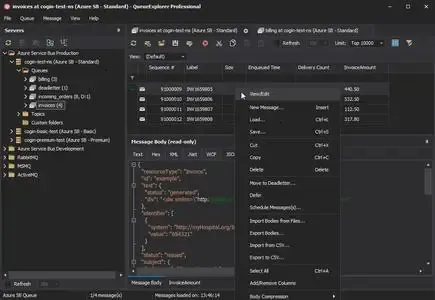
QueueExplorer Professional 5.0.83 | 35.4 Mb
QueueExplorer Professional is a specialized message queue management and diagnostic tool designed for developers, administrators, and IT professionals working with enterprise messaging systems. It provides deep visibility into queues, messages, and messaging infrastructure, making it easier to monitor operations, troubleshoot issues, test applications, and manage message-based workflows.
Supporting multiple queuing technologies from a single installation, the software enables users to inspect, edit, move, copy, resend, and analyze messages far beyond the capabilities offered by standard management consoles. Advanced message viewers and editing tools allow detailed examination of message content, headers, and metadata across various formats.
For development and testing environments, QueueExplorer simplifies the validation of producers and consumers, message simulation, performance testing, and load generation. System administrators can quickly identify failed, poison, or dead-letter messages, monitor queue activity in real time, and restore or migrate messaging configurations when needed.
With extensive filtering, backup, synchronization, and cross-platform queue management capabilities, QueueExplorer Professional serves as a comprehensive solution for maintaining and troubleshooting modern messaging infrastructures.
Key Features:
- Manage multiple messaging systems from one application
- Supports MSMQ, Azure Service Bus, RabbitMQ, and ActiveMQ
- View, edit, copy, move, and delete messages
- Inspect complete message bodies and headers
- Support for XML, JSON, WCF, and .NET objects
- Hex and text message viewers included
- Create and send custom test messages
- Simulate message producers and consumers
- Batch message generation and delivery
- Performance and load testing capabilities
- Send thousands of messages for stress testing
- Investigate failed and dead-letter messages
- Repair and resend problematic messages
- Real-time queue monitoring with auto-refresh
- Monitor queue growth and message activity
- Advanced filtering and sorting tools
- Extract business data using XPath, JSON, or Regex
- Backup and restore messages
- Copy or move messages between queues
- Compare and synchronize queue schemas
- Migrate messaging objects between servers
- Duplicate queues and configurations
- Backup queue structures before changes
- Unified interface across multiple platforms
- Native Windows application for fast performance
System Requirements
Windows 11, Windows 10, Windows 8, Windows 7
Windows Server 2022, Windows Server 2019,
Windows Server 2016, Windows Server 2012,
Windows Server 2008, Windows Server 2008 R2
.Net Framework 4.6.2 or higher
Home Page
https://www.cogin.com/
Buy Premium From My Links To Get Resumable Support,Max Speed & Support Me
Links are Interchangeable - No Password - Single Extraction