

 :
:
Free Download Infinite Skin 1.0.1 | 355 MB (in total)
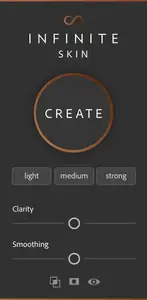
When time is of the essence, Infinite Skin will give you control over skin details so you can save time retouching. With images being so sharp, this panel aims to give you ability to realistically soften skin tone and detail independently right in Photoshop, while ensuring the settings respect the structure of the face. The goal is not to replace retouching, but to use it as a primer for skin so you can spend less time retouching. You'll still have to do some healing and cleaning up transitions, but this aims to make that a bit more forgiving.
This is specifically great for photographers who have to work on large amounts of images with a fast turnaround time. This happens in wedding work, individual portrait clients, boudoir clients, and more. This helps get a head start without having to leave Photoshop too.
High end retouching is still something done by hand and this may not be for everyone, but we recognized the need for it in our industry and where this has a place. We believe that this will pay off in the first day alone with the time saved.
Clarity Slider
When you want control over your details and structure on the skin, this slider will help control that so you can decide how much or little you want.
Smoothing Slider
This helps to even out smooth tone transitions in the skin whether you want a small amount or you'd like to use it for arms and legs and want a bigger smoothing effect.
Options
Pair up the results of Infinite Skin with highlight control and masking options to get to the results you want faster.
A Perfect Split
With a click of a button, the panel sets up frequency separation layers that have the softening settings applied perfectly. You don't have to know different pixel radiuses for frequency separation. Through machine learning, we're able to calculate the perfect radius by automatically analyzing the dimensions of the face.
Highlight Protection
With a click of a button you can protect your highlights to determine if you'd like to keep them more specular, or if you'd like to soften them. This is great for hotspots and highlights that do or do not add to the image. You can decide that separately.
Different Predefined Settings
Even if you don't know how to use the sliders, we have three predefined settings making it easy to quickly change them on the fly regardless of the amount of work that needs to be done.
Masking Options
Whether you want a black mask attached to the image or a skin tone mask, you have the option to pick between the two. We also have the ability to quickly turn off and turn on the mask to see how the settings apply to the entire image which puts things in perspective.
Requirements
* For Photoshop CC2021 or later
* Permanent online connectivity
Home Page -
https://infinite-tools.comLinks are Interchangeable - No Password - Single Extraction