
mobGlow Photoshop Plugin 1.0.1
Free Download mobGlow Photoshop Plugin 1.0.1 (x64) | 43 MB
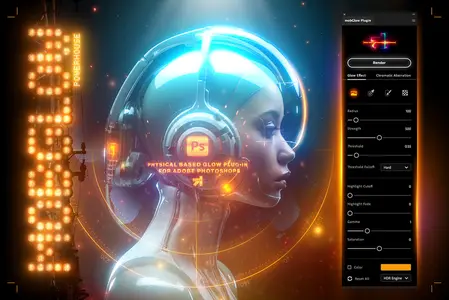
mobGlow plugin for Adobe Photoshop lets you create photorealistic physically correct glow based on inverse-square falloff. Easily re-create soft, dreamy, glowing effects that bring out the beauty of old movies and cinematic film looks captured using diffusion filter lenses.
It is the perfect tool for CGI artists and digital painters who want to integrate diffusion glow effects into their creative workflow seamlessly. Whether you are editing photos, compositing CG elements, or designing graphics, mobGlow is the perfect tool to add a touch of magic to your creations.
FEATURES
* The threshold slider and its falloff can work in three different modes, so you can create more dense or smoother glows.
Choose any range from light to dark, whether you want to glow only the highlights or everything in your image.
* The color sampler tool allows choosing a specific color to glow, providing a powerful, easy, and comfortable way of selecting necessary image areas.
* The quick mask tool allows you to apply the glow only on those areas you paint with a brush.
The created mask always stays in a channel slot, so you can easily edit or reset it.
* You can hide or reveal certain glow parts by drawing complex masks using selections, brush, or gradient tools.
* The color feature gives you an option to tint a light effect into any desired color, giving you stunning vivid results.
* Chromatic aberration controls let you spice up your glow with a subtle color distortion along the edges.
Decide how much color separation is applied by choosing individual channels, their split distance, and blur.
* mobGlow creates an alpha channel, making the black background transparent, giving you complete control
over how your glow is composited with other layers.
* The non-destructive approach makes it possible to render as many glows as you want and edit them if needed.
Just select a glow you would like to edit, hit "Render" and the plugin restores all the settings for this light effect,
so you can proceed editing from where you left off.
* The plugin supports 32-bit mode, delivering super smooth HDR glows.
* Highlight Cutoff allows you to exclude the brightest spots from the glow and light up only the midtone parts of the image.
* Built-in Highlight Fade control makes it easy to decrease the overexposed core of the glow.
Requirements
* Photoshop 2025, 2024, 2023 (Photoshop 24.2.0+)
* Support any Photoshop language.
Home Page -
https://aescripts.com/mobglow-photoshop-plugin/Links are Interchangeable - No Password - Single Extraction
Free mobGlow Photoshop Plugin 1.0.1, Downloads mobGlow Photoshop Plugin 1.0.1, Rapidgator mobGlow Photoshop Plugin 1.0.1, Mega mobGlow Photoshop Plugin 1.0.1, Torrent mobGlow Photoshop Plugin 1.0.1, Google Drive mobGlow Photoshop Plugin 1.0.1. Feel free to post comments, reviews, or suggestions about mobGlow Photoshop Plugin 1.0.1 including tutorials, audio books, software, videos, patches, and more.