

 :
:
Free Download MiniMeters 1.0.19.1926 (Win/macOS/Linux) | 389.5 Mb
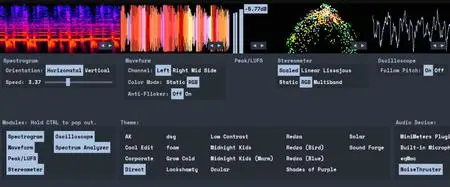
MiniMeters is a simple audio metering Application & Plug-In suite for Windows, macOS, and Linux. In the Standalone app, monitor any stereo Input, Output*, or use the included Audio Server plug-in to send audio into the MiniMeters app. New in v1.0: MiniMeters now includes plug-in versions of each meter and the new Quad Layout. Customize the layout of meters in a Horizontal bar, pop out meters to create a custom layout, or swap to the new Quad Layout for a simple display to cover most needs.
Features
7 modules to choose from to build your perfect metering setup: Spectrogram, Waveform, Loudness, Stereometer, Oscilloscope, VU, and Spectrum.
Arrange each module in any order in a Horizontal bar, pop them out to separate windows to create a custom layout.
Capture your default audio device on Windows, macOS 14.2+, or Linux.
Use the Audio Server plug-in to send audio to MiniMeters directly from your DAW or plug-in host.
Clip the last 10 or 60 seconds of audio received by MiniMeters or start a recording and capture audio from your whole system.
Dive deep and create your own color scheme to set the mood.
No copy protection, just download and install.
Includes VST3 / Audio Unit / CLAP Plug-Ins:
MiniMeters: Standalone
Audio Server (Formally MiniMetersServer) Plug-In: For sending audio from a DAW or host to the MiniMeters Standalone Application
Oscilloscope Plug-In
Spectrogram Plug-In
Spectrum Plug-In
Stereometer Plug-In
VU Plug-In
Waveform Plug-In
Modules
Spectrogram:
Analyze the frequency content of your audio over time.
Choose between Horizontal or Vertical display.
Waveform *Available In Demo*:
Analyze the Volume of your audio over time.
Select "Multi-Band" to see a DJ-style colored Waveform.
Adjust the speed of the Waveform.
Compare the volume of the Low, Mid, and High frequencies using the "History" setting.
Peak/LUFS *Available In Demo*:
View the immediate Peak and LUFS volume in this simple Module.
Stereometer:
Analyze the stereo width and balance with 3 modes:
"Scaled" zooms in on the lower volume audio to show detail you might be missing.
"Linear" shows a unipolar view of your audio.
"Lissajous" shows an unadulterated Lissajous function.
Switch the color to "RGB" or "Multi-band" to see stereo width and frequency content at the same time.
Oscilloscope:
See a detailed waveform view of your audio immediately. With "Pitch Tracking" mode you can easily see the shape of your waveform.
Spectrum Analyzer:
View the frequency content of your audio in "Left/Right" or "Mid/Side" mode.
"Frequency Readout" shows the loudest frequency in your audio. Great for finding that note or tricking your friends into thinking you have perfect pitch.
Adjust the "Slope" to create a flat target to reference your mix against.
...and more
System Requirements:
Windows 10+
x64 (Intel or AMD) processor required
macOS 10.15 or newer
Intel & Apple Silicon Macs supported
Linux Kernel 5.4.0-174 or newer
x86_64 or arm64 processor required
Tested to work on Ubuntu 20.04+
Built on Ubuntu 22.04 using glibc v2.31
Stick Mode:
wlr-layer-shell is required on Wayland.
_NET_WM_WINDOW_TYPE_DOCK is required on X11.
Home Page-
https://directmusic.itch.io/minimeters
Buy Premium From My Links To Get Resumable Support,Max Speed & Support Me
Links are Interchangeable - No Password - Single Extraction