

 :
:
Last updated 5/2015
MP4 | Video: h264, 1280x720 | Audio: AAC, 44.1 KHz
Language: English | Size: 2.28 GB | Duration: 4h 21m
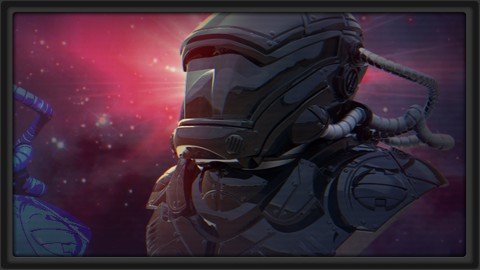
Learn to model this complex 3d asset and learn more about sculpting in ZBrush for games or film.
What you'll learn
Model a mech head or helmet inside of ZBrush
Add quick materials to the object and render it inside of Keyshot
Requirements
Pixelogic's ZBrush
Presentation in Keyshot is shown, though not mandatory
Description
In this series, we're going to jump into an introduction to creating a Mech Head in ZBrush. We'll initially use Dynamesh to create the foundational shapes before refining them and creating new polygroups within each subtool. We'll then extrude some of the polygroups to help create the plating on different parts of the mesh before using some alphas to create some smaller details over the model. We'll utilize the IMM brush particularly to add in elements to our Mech Head to finalize details. Lastly, we'll quickly drop the model into KeyShot for our final test renders.(Students - please look under Section 1 / Lecture 1 downloads for the source files associated with the lesson.)More about the Instructor:Stephen Wells is an expert 3D modeler for characters, props, vehicles, weapons and environments and have created both high and low polygon assets for game productions. He has over 20 years experience in creating a variety of game assets for several different genres (fantasy, sci-fi, combat, superheroes, horror, etc) using 3ds Max, Maya, Photoshop, ZBrush, Mudbox, Topogun, and xNormal. As an enthusiastic instructor, he loves creating video tutorials on a wide variety of subjects to help students better their skillsets.
Overview
Section 1: Blocking out the Major Shapes of the Bust
Lecture 1 Introduction to the Course
Lecture 2 Roughing Out Dynamesh Shapes
Lecture 3 Shaping Up the Helmet
Lecture 4 Adding Elements to the Helmet
Lecture 5 Creating a Neck and Chest
Lecture 6 Using Masking to Pull Out Shapes
Lecture 7 Using the Action Line for Chest Elements
Lecture 8 Tweaking Parts of the Chest
Section 2: Reworking the Chest and Adding Cut Lines
Lecture 9 Introduction
Lecture 10 Drawing in the Chest Plating
Lecture 11 Using Slice Curve for Plating
Lecture 12 Cleaning Up Geometry
Lecture 13 Trying Out a New Helmet
Lecture 14 Reusing and Reworking the Original Helmet
Lecture 15 Extruding the Helmet Plating
Lecture 16 Adding New Bits to the Helmet
Section 3: Refining with Small Details and Final Presentation
Lecture 17 Introduction
Lecture 18 Cutting in Edges with Dam Standard
Lecture 19 Adding Screws with Alphas
Lecture 20 Using the IMM Brush on the Torso
Lecture 21 Using the IMM Brush on the Helmet
Lecture 22 Adding a Piece to the Torso
Lecture 23 Adding in Hoses and Quick Render in Keyshot
Intermediate students who already have a working knowledge of ZBrush
Homepage
https://www.udemy.com/course/3dmotive-sculpt-a-mech-head-with-zbrush-and-present-it-in-keyshot/
https://rapidgator.net/file/8267510cec6e896aa6556d492877aa7b/edxeo.Sculpt.A.Mech.Head.With.Zbrush.And.Present.It.In.Keyshot.part2.rar.html
https://rapidgator.net/file/af2e7a15a30acf83175bc4059f0b3124/edxeo.Sculpt.A.Mech.Head.With.Zbrush.And.Present.It.In.Keyshot.part3.rar.html
https://rapidgator.net/file/c64301319cb228252fef31a9e96a261f/edxeo.Sculpt.A.Mech.Head.With.Zbrush.And.Present.It.In.Keyshot.part1.rar.html

https://uploadgig.com/file/download/473357cd29251CA2/edxeo.Sculpt.A.Mech.Head.With.Zbrush.And.Present.It.In.Keyshot.part3.rar
https://uploadgig.com/file/download/6d6542bd3b28be06/edxeo.Sculpt.A.Mech.Head.With.Zbrush.And.Present.It.In.Keyshot.part2.rar
https://uploadgig.com/file/download/efA7ac7Dd1c596b9/edxeo.Sculpt.A.Mech.Head.With.Zbrush.And.Present.It.In.Keyshot.part1.rar

https://nitroflare.com/view/0D5F0AF79683B9C/edxeo.Sculpt.A.Mech.Head.With.Zbrush.And.Present.It.In.Keyshot.part2.rar
https://nitroflare.com/view/ACDA06C37103E3D/edxeo.Sculpt.A.Mech.Head.With.Zbrush.And.Present.It.In.Keyshot.part1.rar
https://nitroflare.com/view/EB8F2B19259CDEB/edxeo.Sculpt.A.Mech.Head.With.Zbrush.And.Present.It.In.Keyshot.part3.rar
Links are Interchangeable - No Password - Single Extraction